
Parameter settings
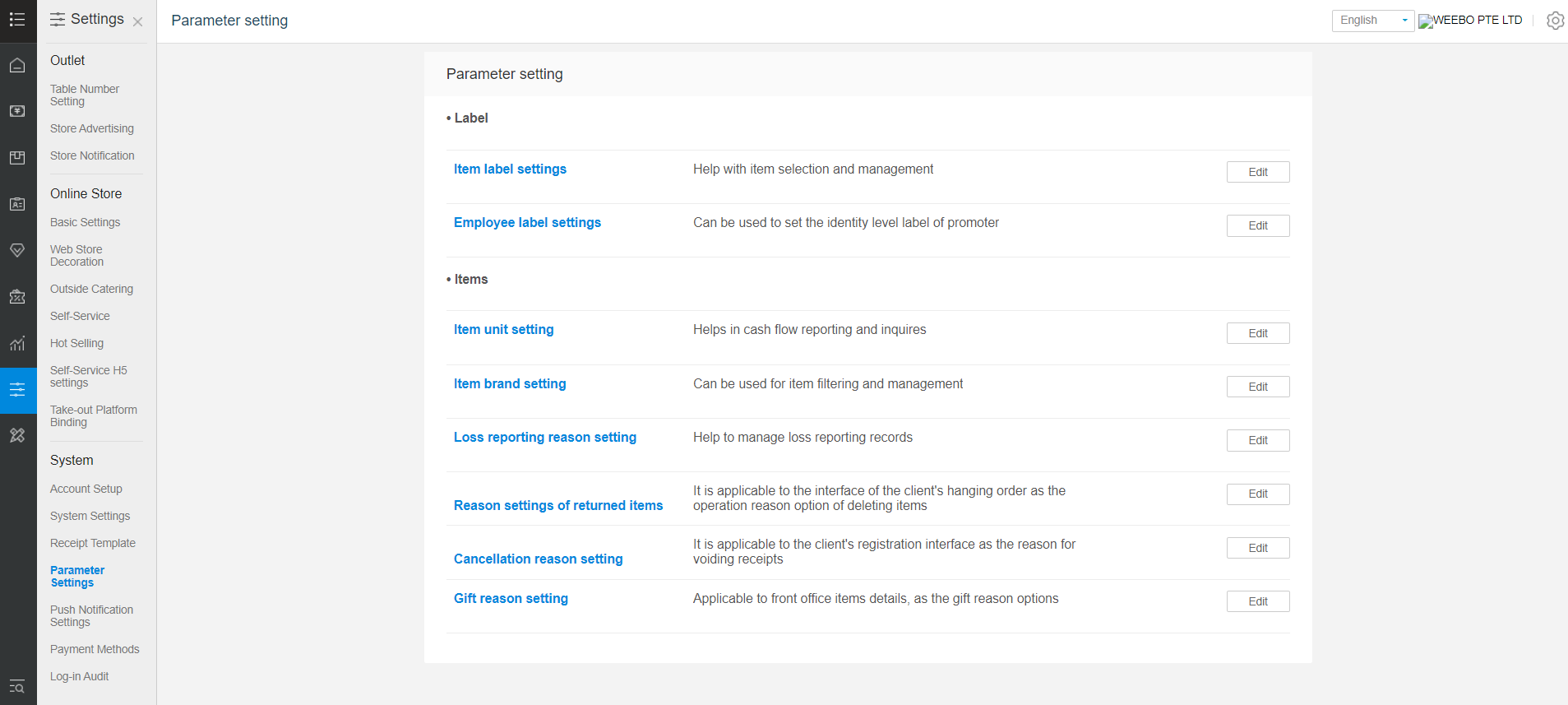
To set up parameter for wastage, unit, cashflow, item label
To set up reason for income and expenses.
Log in to backend.
Go to setting>system>system settings
Click on edit for cash flow option
Click on add
Input the reason for the income and expenses
Click on save
To set up parameter for wastage,
Go to setting>system>parameter settings
Click on edit for loss reporting reason setting
Click on add
Input the reason
Click on save
To set up the unit
Go to setting>system>parameter settings
Click on edit for the item unit settings
Input the new unit name and click new
You can assign the unit to the product at product information to assist in seeing in the reports
To set up item label,
Go to setting>system>parameter settings
Click on edit for item label settings
Input the new label name and click newly added
You can assign the label to product in mass update to assist in managing the products
Note: this is not related to label printing
Any Enquiries? Message us!
If you have any question or concern, please fill below and we’ll get back to you shortly.
Get in Touch with Us


7 Holland Village Way, #05-03/05 Tower Lobby B, One Holland Village, Singapore 275748

Call us for a Quote

+65 8771 8700
+65 6850 5177
Stay Connected
Copyright © Weebo Pte Ltd All Rights Reserved.