
How to set up the POS machine C7
Follow the steps to set up the POS machine
-
Take out the POS machine from the box, there should be a main POS machine, power cable, cash box and RJ11 cable.
-
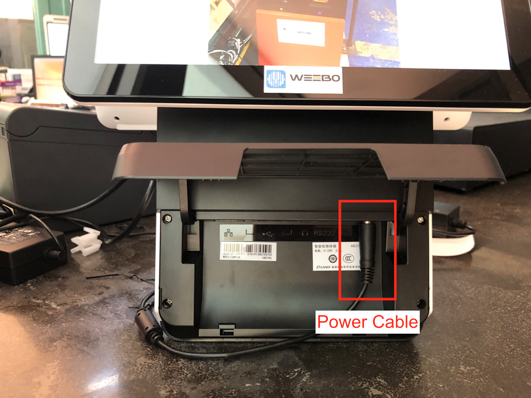
Connect the POS machine to power using the power cable.
Open the cover behind the POS and plug into the power port (1st port from the right)
-
Connect the POS to the cashbox using the RJ11 cable.
Open the cover behind the POS and plug into the 2nd port from the right on the POS side. Ensure plug in to the correct port for the RJ11 cable to prevent damage of the cable head. -
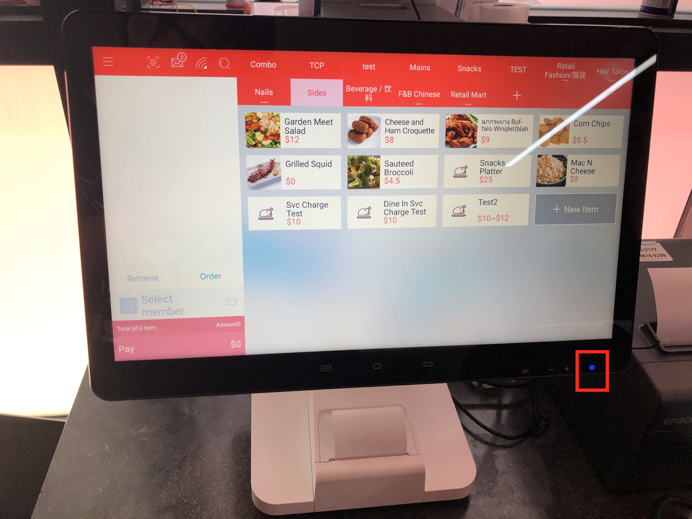
Now power on the POS by pressing the POWER button on the right at front.
-
Swipe to unlock and locate the Weebo POS app.
-
Key in the user and password to login the Weebo POS.
-
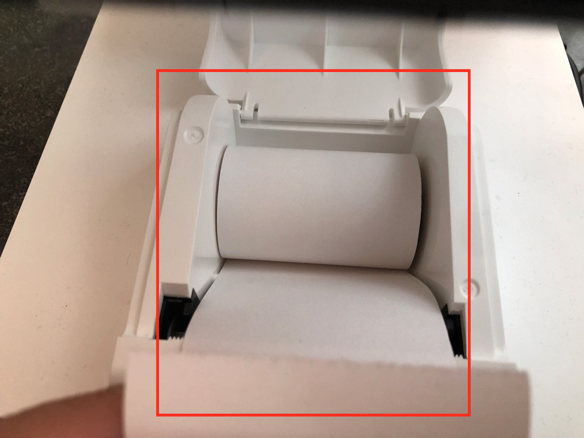
Place in a paper roll for the receipt printer.
-
The paper roll would be located on the front side. For this machine pull up the cover to open the paper roll cover
-
Place the paper roll inside in counter clockwise direction when looking from the left.
-
Close the cover.
-
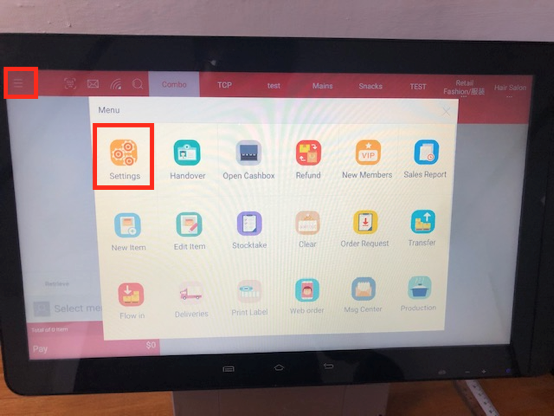
Enter the setting page.
-
In the case where, 2 receipt are required, change the amount of receipt to 2.
-
In the case where kitchen slip is required, enable the kitchen receipt.
Any Enquiries? Message us!
If you have any question or concern, please fill below and we’ll get back to you shortly.
Get in Touch with Us


7 Holland Village Way, #05-03/05 Tower Lobby B, One Holland Village, Singapore 275748

Call us for a Quote

+65 8771 8700
+65 6850 5177
Stay Connected
Copyright © Weebo Pte Ltd All Rights Reserved.